KhatimDoc
High Trust, Flexible, Contract Signing with Digital Signatures
Revolutionize Contract Signing with Digital Signatures
KhatimDoc offers a seamless and legally binding contract signing experience powered by digital signatures—going beyond basic e-signatures to ensure security, authenticity, and compliance. With advanced cryptographic technology, KhatimDoc guarantees the integrity and verification of every signed document.
- Perform e-signatures, digital Signatures or eseals
- Provides builtin workflows & form filling
- Compliant with industry regulations: eIDAS, ESIGN Act, UETA & more
What sets KhatimDoc apart compare to other digital signature solutions?

e-IDAS Compliant
Gain the confidence of knowing that your contracts are secure and legally binding with advanced long term eIDAS-compliant digital signatures. Protect the integrity of your agreements and eliminate the risk of tampering or dispute with robust digital signature solutions.

Self-Managed
- Freedom to self-host
- Enhanced control and security
- Ensure data sovereignty
- Meet regulatory requirements

Enterprise Driven
- Manage Organization & Team accounts.
- Set up fine-grained roles and rights.
- API powered.
- Delegate control.

E-Sign, D-Sign or E-Seal
A single portal of KhatimDoc allows organizations to manage all flavours of signatures with HSM held keys or Smartcards.

Core Features
Productivity
-
Sign any time, any where
Collaborate effortlessly with stakeholders across different locations and time zones. Empower your team and clients to sign documents from anywhere, on any device, and keep your business moving forward with speed and flexibility.
-
User Experience
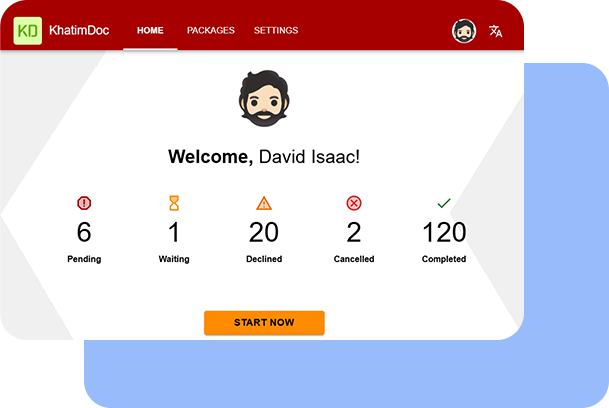
Delight in a seamless user experience with Khatim Doc, where you can effortlessly setup workflows, navigate through quick filters and access package info. Breeze through form filling, ensuring a smooth and intuitive document management journey.
-
Multiple Workflows
Create and manage multiple workflows from a single dashboard with multiple documents (package) to process. Add multiple reviewers or signers in a workflow. Recipients can sign or approve as per their roles. Allow serial or parallel workflows.
-
Collaborate
Collaborate with recipients using form fields (date, text, number, list, checkbox), initials, e-sign & digital signatures. -
Multiple Signing Modes
Allows e-signatures or digital signatures as per your regulatory or business needs. -
Package Signing
Simplify multi documents processing by allowing multiple documents in a package with multiple signers or approvers. -
Templates
Save time using templates allowing pre-configured documents, recipients, roles and rights. Just change what you want in a template and send the package. -
Central Doc Gallery
Setup central document gallery to allow quick access to frequently used documents. This helps avoiding uploading documents each time. -
Agreement Notices
Allows document owner to setup agreement notices shown to the recipients prior opening the document to be signed or approved. This helps promote transparency, clarity, and informed decision-making.
To learn more, see Enterprise Productivity with Secure e-Signatures & Digital Signatures.
Security & Compatibility
-
Adobe Reader Compatible
Our digital signatures are not only compatible with Adobe Reader but also adhere to the PAdES (PDF Advanced Electronic Signatures) standard. This ensures that your digitally signed documents meet the highest industry standards for electronic signatures and can be easily validated and trusted across platforms. -
Standard & Compliant
Supports industry regulations, including the eIDAS, ESIGN Act, UETA, HIPAA and FDA 21 CFR Part 11, allowing you to confidently meet legal requirements and maintain the highest standards of data integrity and security. -
Cryptographic Agility
KhatimDoc server supports diverse cryptographic requirements such as:
RSA (2048, 4096, 8192)ECDSA (192, 224, 256, 320, 384, 512)SHA-256, 384 and 512 hashing algorithms -
Notifications
Helps you process documents with KhatimDoc’s built in notification engine notifying recipients via email or SMS to process pending documents. Owners get notification on workflow completion as well. -
Document Tracking
Owners can easily track areas like: package states, who has signed and when, whether it was approved, signed or declined with declining reason. -
User rights
Apply further control by settings user access rights, document access PIN, private notices and access time limits for a package.
For more details, see Secure & Adobe Compatible Digital Signatures.
Enterprise Ready
-
Enterprise Management
Simplify administration by setting organization and teams account and invite members. Teams can create their own templates, doc gallery, agreements & contacts while organization can configure these globally. -
Developer Integration
Simplify user enrollment and workflow initiation by seamlessly integrating with Khatim Doc’s Restful Interfaces, allowing effortless connectivity with your existing ERP, ECM, and CRM solutions. -
Server & Local signing
Sign documents locally using either HSM held keys or Smart Cards. Smart Cards or cryptographic USB token adds an extra layer of security and convenience to your digital signing process. -
Branding
Customize your document management experience with our white-label solution, empowering you to showcase your organization’s unique identity through personalized logos and theme colors. -
Powerful PKI Engine
KhatimDoc integrates with Khatim PKI Server for all its crypto processing including certificate issuance, revocation and digital signature creation. This allows reusing your existing PKI investments while allowing better control over key management and its life cycle. -
Cross Platform, Diverse Deployments
Whether you choose Windows or Linux, our platform-independent solution seamlessly adapts to your environment, including on-premise private or public cloud, VMs, and physical machines. Enjoy the flexibility of deployment options that suit your specific needs.
For more details, see Enterprise Ready Digital Signature Software.

Deployment
-
Supported OS
All flavors of Windows Server & Linux (Centos Stream, Ubuntu, RedHat, Fedora)
-
Languages
50+ Languages (English, Chinese, French, Italian Spanish, Arabic, German, Portuguese etc.)
-
Minimum H/W Requirement
8 GB RAM, 2 vCPU (2.3 GHz), 10 GB disk space.
Words from Client
Leading companies rely on us for their PKI and digital signature needs
We recently had the pleasure of working with the talented team at Codegic to develop an e-signing platform. From the initial consultation to the final delivery, Codegic’s team was attentive to our needs and consistently went above and beyond to ensure the success of the project. Their knowledge of the latest technologies and industry best practices was evident in every aspect of their work, and they were able to deliver a high-quality product that met all of our requirements.
Calvin Tan, Director, Hiend Software Pte Ltd.
Pricing
- KhatimDoc is charged per bundle
- Each bundle allows you to deploy 2 instance of KhatimDoc servers in high availability mode
- To add more servers in your existing pool; Add more bundles OR Buy a single server instance at 50% of the bundle price
- Test environments or Staging environments are charged 50% of the price
Maintenance Plan
With active annual software maintenance plan:
- Keep your installation safe and secure with the latest security updates
- Get free access to the newest features, enhancements, and bug fixes
- Get premium support from our technical engineers (within 24 hours on business days)
FAQs
Can we integrate with existing CAs?
Naturally, integrating KhatimDoc with your current CAs is possible, and any customization required for the integration will be free of charge.
What is needed to run KhatimDoc?
Deploying KhatimDoc requires three core components:
– KhatimDoc software and an efficient hardware on which to deploy
– Khatim PKI Server; to generate user keys and signatures
– Cryptographic Hardware; Such as an HSM, ensures that the keys utilized to create digital signatures.
How can developers integrate with KhatimDoc?
Developers can use any programming language to integrate with KhatimDoc’s API interfaces based on JSON. Contact us for programming samples.
How many KhatimDoc instances I need to deploy?
Deploy at least two instances initially for high availability and add more as needed to achieve the desired transaction per second (TPS) rate. KhatimDoc allows for an unlimited number of instances to be deployed. Consider deploying in both staging and disaster recovery (DR) zones.
How can we boost the performance of KhatimDoc?
There are many factor which can boost the performance. This includes:
– Opting for ECDSA over RSA keys (Check with your HSM vendor too)
– 2048 bit RSA keys over 4096 bit
– 384 bit ECDSA key over 521 bit
– Deploying multiple load balanced servers instead of a single instance
– Deploying KhatimDoc near your client region with low network latency
– Using HSM for keys storage instead of software
– Using a PCI based HSM over network/cloud based HSM
How to choose the right contract signing solution?
Choosing the right contract signing solution could be difficult. Use the following checklist to choose the right one for your needs:
– Does it provide quick installation and simple configuration?
– Does it provide the throughput you expect & scales quickly?
– Does it support PAdES standard?
– Does it raise alerts in case of failures?
– Does it provide easy to integrate APIs?
– Does the vendor provide quick support?
– Are all operations done securely?
– Does it fit your budget?
Can alerts to be pushed to a central logging system?
KhatimDoc features an integrated logging system that records all incoming requests and responses, while also alerting administrators of any issues. Furthermore, secure notifications can be sent to central logging systems such as Splunk, Grafana, Greylog, LogRhythm, and others.
Which technology stack is used?
KhatimDoc is built with Java (OpenJDK) and Apache Tomcat, providing platform independence and allowing for easy deployment on multiple platforms such as Linux, Windows, and Mac.