Certificate lifecycle management for IIS is the automated issuance, renewal and installation of the TLS certificates your sites present — without an engineer importing a PFX and editing bindings in IIS Manager. PKI Insights runs this entirely inside your own network. The agent runs on the web server itself, generates the key pair there, obtains the certificate from the authority you already use, imports it into the Windows certificate store and updates every https binding you have placed under management. The private key is created on the machine it protects and never leaves it.

What happens on IIS when a certificate expires
IIS binds to a thumbprint, not to a name. The https binding records the specific certificate it was configured with, and that thumbprint is unique to that certificate. Renew the certificate and the thumbprint changes.
So IIS carries on presenting the old one. It does not notice the new certificate sitting in the same store, does not re-resolve the binding, and does not warn anybody. Until an engineer opens Bindings on each affected site and selects the new certificate, every client connecting over TLS is served an expired certificate.
That is the part worth dwelling on: the failure is silent. Nothing in IIS logs an error, because from its point of view nothing is wrong. The binding points at a certificate and that certificate is being served. The first signal is usually a user.
The procedure to fix it is not difficult. What changes is how often it has to run. Public TLS certificate lifetimes are contracting on a schedule set by the CA/Browser Forum, and each reduction multiplies the work against an estate that keeps growing — every binding, on every site, on every server. Internal certificates issued by a private CA, which on a Windows estate is usually most of them, sit outside that schedule entirely and tend to be tracked even less carefully.
Read the full analysis:
The 100-day deadline lands March 2027
Either way it is the same operation, repeated across every binding in the estate, indefinitely. That is what automation is for — provided you know what is in the estate to begin with.
Start with what is actually there
Most Windows estates cannot produce an accurate list of the certificates their web servers are presenting. Bindings get added for a migration and never removed. A wildcard is imported once and bound on four servers. An internal application nobody owns terminates TLS on a host that was rebuilt two years ago.
Automating renewal across an inventory you have not verified renews the certificates you happened to remember.
PKI Insights begins with discovery, not renewal. Network discovery scans a CIDR block or a list of endpoints across a port range, connects to everything presenting a certificate, and records the endpoint, port, certificate details, key information, purpose and days to expiry. Anything found that is not already under monitoring is flagged and exported as CSV, ready to import straight into monitoring or renewal.
Run it across your server subnets before you configure a single renewal. On a Windows estate the gap between what discovery returns and what the inventory says is usually wider than anyone expects, because certificates land on servers through Group Policy, through application installers, and through engineers who have since moved on.
Where the key is generated, and where it stays
This is the section a security reviewer reads twice, and on IIS it is also the clearest difference between PKI Insights and the alternatives.
The PKI Insights Agent runs on the IIS server itself. The key pair is generated there. The CSR is built there. The certificate comes back there and is imported into the Windows certificate store on that machine. At no point does the private key exist anywhere other than the server whose traffic it protects.
What crosses the network is the CSR going out and the issued certificate coming back. Both are public objects. There is no PFX in transit, nothing to intercept that matters, and no copy of the key on a management platform, on a file share, or in a vendor’s cloud.
It is worth being explicit about why that is not the norm. A platform that issues centrally has to get the key to the endpoint somehow, and the usual mechanism is a PFX — a container that holds the certificate and its private key — written to the server by an agent or fetched from a share. That works, and it is how most of this market operates. But it means the key was created somewhere other than where it lives, travelled, and existed in at least two places. In a regulated environment that is a question you will be asked, and “we ship a PFX to the server” is a harder answer than “the key was never anywhere else.”
Key, CSR and the assembled files are written to a fixed path under the agent’s own installation directory, one folder per scan target and one per renewal event, so nothing collides and every event is traceable:
<agent installation folder>/clm/<scan target name>/secrets-<cert common name>-<date-time>Keys are pruned on a retention schedule (clm_keys_retention_days, default 180 days), so material does not accumulate on the host indefinitely.
Which component talks to your CA depends on the CA:
| Certificate authority | Reached by | Protocol |
|---|---|---|
| Private CAsYour own PKI. Internal virtual servers, management interfaces and service-to-service TLS. | ||
| Microsoft ADCS | PKI Insights server, directly | certutil |
| EJBCA | PKI Insights Agent | EJBCA REST API |
| HashiCorp Vault | PKI Insights Agent | Vault REST API |
| Public CAsBrowser-trusted. Internet-facing virtual servers where public trust is required. | ||
| DigiCert | PKI Insights Agent | ACME or direct API |
| Sectigo, and any ACME-compatible public CA | PKI Insights Agent | ACME |
For ADCS, PKI Insights communicates with the CA directly from a domain-joined server; no agent is involved in issuance. For every other authority the agent holds the credentials and makes the call.
Deployment prerequisite for ADCS: the PKI Insights server must be domain-joined, have a network path to the issuing CA, and hold enrolment rights on the template you intend to use.
Every binding in one pass
IIS binds by thumbprint, so a renewal that updates one binding and leaves the others is worse than no renewal at all — part of the estate moves and part does not, and the part that did not is the one that fails.
A renewal scan target for IIS takes the Website Name and the Bindings that certificate should serve, as a comma-separated list: localhost:443, myhost:443, testing:443, 192.168.1.15:443. On renewal, the agent imports the new certificate and updates all of them together, in a single operation, to the new thumbprint. There is no sequence of manual edits and no opportunity to miss one.
Naming the bindings is a scope decision rather than a data-entry exercise. A web server often hosts sites that legitimately take different certificates — an internal application on one binding, a customer-facing site on another — and the scan target is where you say which of them this certificate covers. What you are not doing is transcribing information to keep two systems in step; you are stating intent once, and the renewal honours it every time.
(This is the mirror image of how the same problem appears on Citrix NetScaler. There, a virtual server binds to a certificate-key pair rather than to the certificate itself, so one renewal reaches every virtual server bound to that pair automatically. IIS has no such indirection — which is exactly why the bindings have to be handled together rather than one at a time.)
Bring the certificate authority you already have
Most CLM platforms are built around a preferred authority, and the further you move from it the more the automation degrades. Several products aimed at IIS are built on ACME and a free public CA, with delegated DNS validation as the mechanism. That is a reasonable design for public web servers. It is a poor fit for the rest of a Windows estate.
A real IIS estate is mostly internal. Intranet sites, line-of-business applications, management consoles, internal APIs, test and staging environments — none of them face the internet, none of them need browser trust, and a public CA cannot issue for them at all because the names are not publicly resolvable. They come from your own PKI, which on a Windows estate is almost always Microsoft ADCS.
PKI Insights treats the CA as an interchangeable component. Public certificates from DigiCert or Sectigo where browser trust is required, internal certificates from ADCS, EJBCA or HashiCorp Vault everywhere else, both in one inventory with one renewal engine and one set of expiry dates.
Automating IIS renewal from Microsoft ADCS
This deserves its own heading because it is the case the rest of the market handles worst, and on IIS it is the majority of the estate.
ADCS has no native ACME responder. A CLM platform built on ACME therefore has one of three answers when your IIS certificates come from an internal Microsoft CA: stand up an ACME front-end for ADCS, fall back to NDES and SCEP, or move the certificates to a public CA instead. The first is a project. The second carries its own security baggage. The third is not available for internal names at all.
Competing products do mention ADCS support, usually in a line near the bottom of the page, after several screens about ACME and public issuance. What that line rarely says is how — and the how is the part your PKI team will ask about.
PKI Insights issues from ADCS using certutil against the CA directly, with the certificate template named in the scan target. No ACME layer, no protocol gateway, no NDES, no change to the CA. It is the primary path rather than a compatibility note.
Configuring a renewal scan target
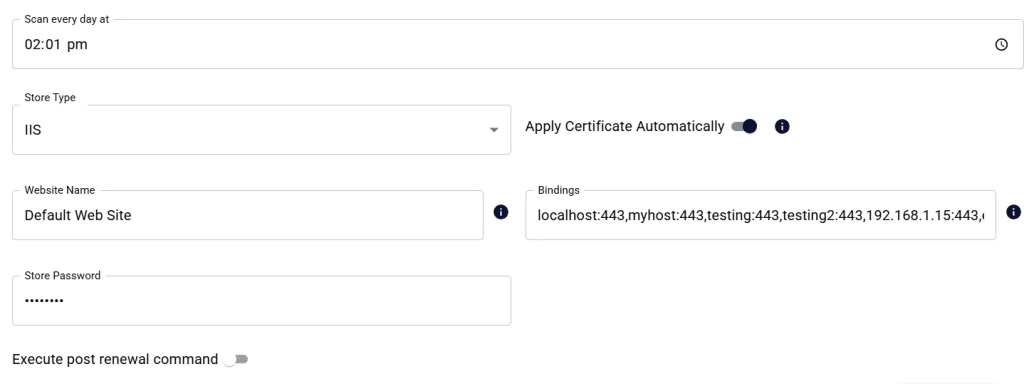
The scan target defines what gets renewed, when, from which CA and in what form.
- Scheduling. Set Auto-Renew (Days before Expiry) to the lead time you want, and the daily time the check runs. PKI Insights raises
CERT_ABOUT_TO_RENEWand notifies the certificate owner one day before the renewal executes, so the change is never a surprise. - Site and bindings.
Website Name identifies the IIS site; Bindings lists the https bindings this certificate should serve. Store Password protects the certificate store material the agent assembles on the server. - Identity. Provide the SAN values and the subject DN. On IIS you can also enable Use SAN if found in the existing cert, and the renewal inherits the SANs from the certificate already installed rather than requiring them to be specified again. On a server hosting several sites, each with its own SAN list, that removes most of the per-site configuration — and it means a certificate whose SANs were correct yesterday stays correct after renewal without anyone re-checking.
- Cryptography. Key type RSA or ECDSA, with curve and size, and the hash algorithm used for the CSR.
- Chain packaging. Choose whether the delivered certificate is the leaf alone, the full chain excluding the root, or the full chain including the root.
- Post-renewal command. Enable Execute post renewal command where the application needs something beyond a binding update — recycling an application pool, restarting a dependent Windows service, or triggering a downstream configuration step. The certificate work is done by the integration; the command handles whatever is specific to your application.
- Certificate authority. Select the CA connector that will issue. Where the CA requires it — ADCS in particular — name the template.
Zero-touch, or staged for a change window
Apply Certificate Automatically is a toggle, and on IIS it matters more than on most platforms.
Left enabled, the renewal runs end to end without intervention: issued, delivered, installed, and every binding under management serves the new certificate from that moment.
Turned off, PKI Insights renews the certificate and holds it. The new certificate appears in the Certificates section and an administrator applies it when they choose — inside an approved change window, after a CAB, or alongside the rest of a scheduled maintenance slot.
Most of this market sells zero-touch as the only mode. For a regulated environment where a change affecting several production sites requires an approved window regardless of how safe the change is, that is not a feature, it is an obstacle. Being able to separate issuance from application means the renewal is prepared automatically and applied under whatever governance your organisation actually operates.
On a server hosting a production application, the binding update is instantaneous and does not interrupt existing connections, but the change is still a change — staged mode exists so it lands inside an approved window rather than whenever the schedule fires.
Verification, alerting and audit
An automated renewal that reports success has told you the script finished. It has not told you what the site is serving.
Point Network Monitor at the site and PKI Insights connects to the live endpoint and grades what it finds: expiry, weak key or signing algorithm, certificate lifetime against CA/Browser Forum guidance, RFC 5280 and CA/B linting, TLS protocol and cipher suite conformance from SSLv2 through TLS 1.3, and post-quantum readiness of the handshake. Endpoints are graded A+ through F, with X where no certificate was found at all. Each endpoint carries a certificate history showing every certificate that has been served at that address over time.
The renewal path raises its own alerts — CERT_ABOUT_TO_RENEW, CERT_ISSUED, CERT_RENEWED, CERT_RENEWAL_FAILED — with the failing CSR available against the alert for diagnosis. Daily renewal summaries and per-owner certificate reports go out by email, and operator logs record who changed which scan target, when, and what the previous value was.
Between the renewal record and the endpoint grade you have both halves of the evidence an auditor asks for: that the certificate was renewed, and that the renewed certificate is the one in production.
When there is no native connector
IIS is a supported platform with a built-in integration. Not everything in an estate is.
For systems PKI Insights does not natively connect to — a bespoke application storing its certificate somewhere proprietary, an appliance reachable only through a jump host, a platform your organisation runs and nobody else does — the CLM module is extensible with scripts, in PowerShell or bash, configured inside the same scan target as everything else.
The platform still performs every security-sensitive step. Discovery, key generation, CSR creation, CA communication, format conversion and renewal scheduling all remain with PKI Insights and the agent. Only the final handover is delegated.
Scripts receive their input as base64-encoded JSON in the PKI_INSIGHTS_SCRIPT_DATA environment variable — never on the command line, which keeps operator-supplied arguments out of process listings and shell history. Up to fifteen arguments are stored encrypted, so credentials and tokens are safe to pass. Delivered files are named explicitly (certFile, keyFile, chainFile, pfxFile) rather than left to be identified by array position or file extension.
Four phases run, each with its own editable timeout: discovery, pre-installation, certificate delivery and post-installation. A script that returns non-zero is reported as a failing script, distinctly from an agent fault — so an operator is never told the agent is unreachable when their script simply exited.
A scripted endpoint appears in the same console, with the same expiry countdown and the same renewal history, as a natively integrated one. Support for a new platform does not require waiting for a release.
Why not win-acme, certreq or a scheduled script?
certreq and Windows ACME Simple both run per server. That means ACME credentials, or HTTP-01 validation and an open port 80, on every machine that terminates TLS. In a segmented network or a hardened build that is not available, and in an air-gapped enclave it is not possible at all.
They are also public-CA tools. For the internal majority of an IIS estate they do not apply, so you end up running one mechanism for public certificates and another for internal ones, with two inventories and two sets of expiry dates. The gap between those inventories is where outages live.
Scripting it yourself has the familiar sharp edges: credential handling, chain assembly, updating every binding rather than the one you were thinking about, keeping it working after the next Windows update, and the ownership question that surfaces the day the engineer who wrote it changes role.
PKI Insights keeps key generation, CA communication, installation and binding updates inside one audited, monitored path — with no ACME client on the server, no DNS credentials, no inbound firewall rule and no scheduled task to maintain.
IIS is one part of the estate
The same agent, the same inventory and the same renewal engine cover the rest of what terminates TLS in your environment: F5 BIG-IP, Citrix NetScaler, FortiWeb and HAProxy at the edge; IIS, NGINX, Apache Tomcat and Oracle WebLogic behind it; Microsoft SQL Server, PostgreSQL and MySQL in the data tier; ADFS, Exchange and RDP across Microsoft infrastructure; Citrix StoreFront and RabbitMQ alongside.
Certificate lifecycle management is only half the problem
Automating renewal on a PKI you have not assessed propagates misconfiguration faster than it fixes it. Weak templates, excessive enrolment permissions, improper key usage and the ADCS ESC escalation paths are not corrected by automation — they are renewed on schedule, four times a year, with less human review at each step.
Automation keeps certificates alive. Posture keeps trust intact.
PKI Insights combines certificate lifecycle management with continuous PKI posture assessment across ADCS, EJBCA, Microsoft Cloud PKI and HashiCorp Vault, HSM monitoring, and post-quantum readiness across certificates, endpoints and issuing infrastructure.
What should enterprises prioritise first: PKI CLM or PKI Posture?

FAQ
Does the private key leave the Microsoft IIS server?
No. The PKI Insights Agent runs on the IIS server, generates the key pair there, and the key stays on that machine. Only the CSR leaves it, and only the issued certificate comes back. No PFX containing the key is transferred to the server, because the key was never anywhere else
IIS binds by thumbprint — how does the renewal reach every binding?
The scan target lists the bindings that certificate serves. On renewal the agent imports the new certificate and updates all of them together, in one operation. There is no sequence of manual edits in IIS Manager and no binding left pointing at the superseded thumbprint.
Do I have to specify SANs for every site?
Not usually. Enable Use SAN if found in the existing cert and the renewal inherits the SAN list from the certificate currently installed. On a server hosting several sites this removes most of the per-site configuration.
Can the renewal recycle the application pool or restart a service?
Yes. Execute post renewal command runs whatever step your application needs after the certificate is in place.
Can PKI Insights renew IIS certificates issued by an internal Microsoft CA?
Yes, and this is the primary path. PKI Insights issues from Microsoft ADCS using certutil directly from a domain-joined server, with the certificate template named in the scan target. No ACME front-end, no NDES, no protocol gateway. Most of a Windows estate is ADCS-issued, and it should not be the part your automation cannot reach.
Which certificate authorities are supported?
Microsoft ADCS via certutil, DigiCert via ACME or direct API, Sectigo via ACME, EJBCA via its REST API, and HashiCorp Vault via its REST API. Public and private authorities can be used side by side in a single inventory.
Can PKI Insights run without internet access?
Yes, where the issuing CA is reachable from inside the enclave. Discovery, issuance, installation, monitoring and renewal all execute locally, with certificates issued from Microsoft ADCS, EJBCA or HashiCorp Vault. A publicly trusted CA such as DigiCert or Sectigo is unreachable by definition in an air-gapped network, so issuance comes from your private PKI.
Do we have to give up change control to automate renewals?
No. Apply Certificate Automatically can be disabled, in which case PKI Insights renews the certificate and holds it for an administrator to apply from the Certificates section — inside an approved change window rather than whenever the schedule fires.
Does the IIS server need to reach the internet?
No. The agent talks to PKI Insights inside your network, and issuance happens against whichever CA you have configured. Where that CA is internal, nothing in the renewal path touches the internet at all.
How do we know the new certificate is actually being served?
Point a Network Monitor scan target at the site. PKI Insights connects to the live endpoint, grades the certificate it is presented with, checks TLS protocol and cipher conformance, and keeps a history of every certificate served at that address. On IIS this matters more than on most platforms: a stale thumbprint binding fails silently, and connecting to the endpoint is the only way to confirm the renewal actually took effect.