Your next certificate renewal could break mutual TLS between your services, sever a partner API integration overnight, and stall your deployment pipeline. And nothing in the error messages will tell you why.
This is not a hypothetical. Publicly trusted Certificate Authorities are getting out of the client authentication business. The certificates they issue are becoming single-purpose: they authenticate your servers to the world, and nothing else. Every system in your estate that quietly relies on a public TLS certificate to prove its own identity to something else will stop working. Not on the deadline. On the day that particular certificate happens to renew.
The industry deadline is March 2027. Your real deadline is your next renewal cycle. Here is what changed, why, what breaks, and the two steps that get you ahead of it.
What Has Actually Changed
For most of the history of the public web PKI, a single TLS certificate did two jobs. It carried two Extended Key Usage (EKU) values, small fields inside the certificate that declare what the key is allowed to do:
Server Authentication (id-kp-serverAuth): proves a server’s identity to a connecting client. This is what your HTTPS site uses.
Client Authentication (id-kp-clientAuth): proves a client’s identity to a server. This is what mutual TLS, EAP-TLS, and device authentication use.
Public CAs issued both together by default. One certificate, two purposes, no extra cost. Convenient, and as the industry has now concluded, structurally wrong.
That dual-purpose certificate is being retired. Publicly trusted TLS certificates will assert server authentication only. The client authentication value is removed, and you cannot ask for it back. Certificates that already carry it stay valid until they expire, then come back without it.
One point is worth getting right, because a lot of the coverage muddles it. This is primarily a root program requirement, not a single CA/Browser Forum ballot. The driving policy is the browser root programs’ demand for dedicated, single-purpose hierarchies. Critically, the separation happens at the CA level, not just in the certificate profile: any subordinate CA chaining to a browser-trusted root must now assert serverAuth only, and that constrains everything issued beneath it.
The Forum’s parallel work on validity periods, stepping maximum TLS lifetimes down toward 47 days, is a different change running on an overlapping timeline. Two separate deadlines, two separate remediation efforts, both landing on the same team.
Left: the dual-purpose certificate being retired. Right: the dedicated client certificate you will issue from a private CA instead — the same EKU field, with serverAuth absent.
Left: the dual-purpose certificate being retired. Right: the dedicated client certificate you will issue from a private CA instead — the same EKU field, with serverAuth absent.
Two Kinds of Affected Certificate
Because the rule operates on hierarchies rather than individual certificates, two quite different populations are caught by it. Most coverage treats them as one, which is where the confusion starts.
The accidental client certificate. You bought a certificate for api.example.com to secure a web service. It arrived with both EKUs because that was the default profile. Somewhere along the way, that same server started making outbound calls — to a partner API, a payment gateway, an internal service — and presented the same certificate as its client credential. It worked, so nobody looked closer. This is the large population, and it is the subject of this article.
The deliberate client certificate. You bought a certificate specifically to authenticate a user, device, or system. Here nothing was accidental; client authentication was the product.
For this second group, the change works differently. The CA is not stripping clientAuth out of a certificate whose entire purpose is client authentication. What happens instead is that the product moves out of the browser-trusted hierarchy, because a browser-trusted TLS hierarchy can no longer produce a client certificate of any kind — not dual-purpose, not clientAuth-only. Depending on the CA, that means one of three outcomes: the product continues from a separate, non-browser-trusted hierarchy; it continues under a root that OS trust programs still carry for client authentication; or it is discontinued because maintaining a dedicated audited hierarchy for a low-volume line is not worth it.
Either way, the trust anchor changes, and anything validating those certificates needs the new root installed. Check with your CA which of the three applies to you.
There is a useful realization buried in this. Your VPN gateway, RADIUS server, or API endpoint never validated against a browser root store to begin with — it validates against whatever trust store you configured on it. If you are installing and maintaining a trust anchor there regardless, a public CA was buying you third-party identity vetting and someone else’s revocation infrastructure, but never automatic trust. That is a much thinner value proposition than it looks, and it is worth weighing honestly against running your own.
The Obvious Workaround Does Not Work
Before designing anything, know that one plan is already closed off.
You cannot take your existing intermediate CA, re-sign it under your own private root, and carry on issuing client certificates from it. Once that key has been used in a server authentication hierarchy, it is locked to that purpose. Reusing it is not permitted.
New hierarchy, new keys, new ceremony. Hold that thought, because it turns out to be an opportunity rather than a cost.
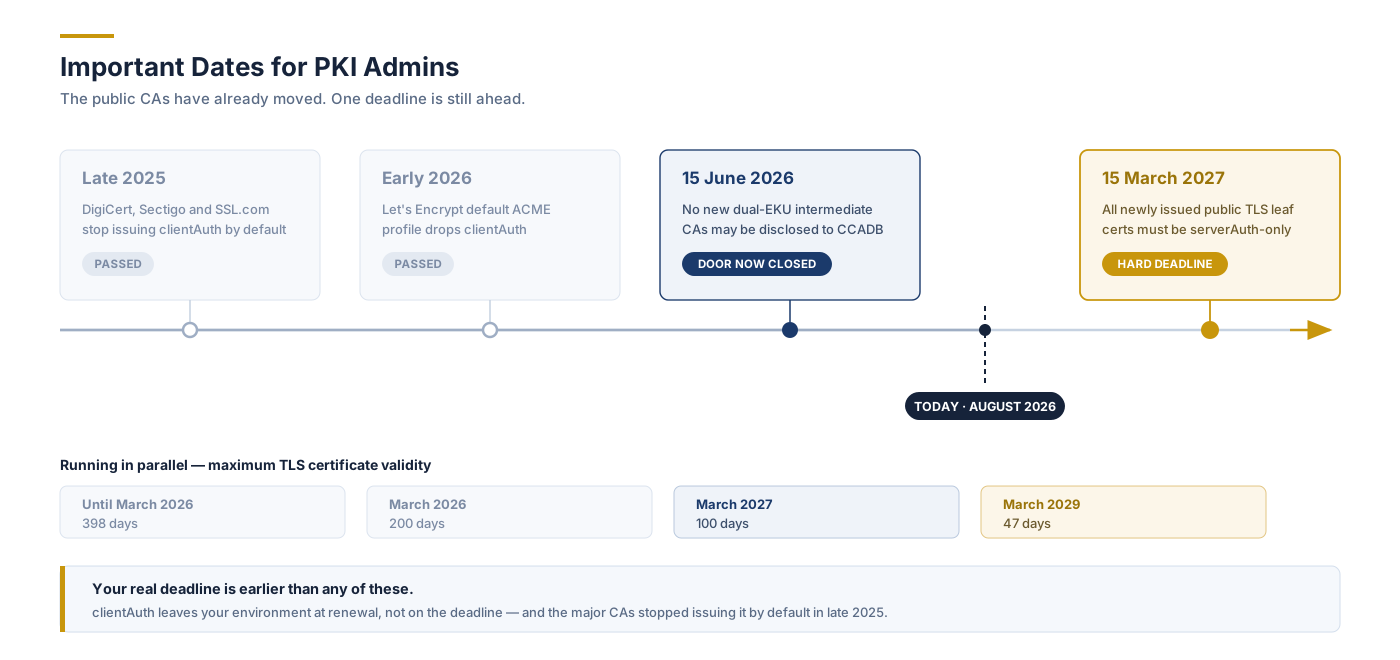
Important Dates for PKI Admins
Date
What Changes
Status
Late 2025
DigiCert, Sectigo and SSL.com stop including clientAuth by default
New intermediate CAs disclosed to CCADB must be serverAuth-only
Passed
15 March 2026 → 2029
Maximum TLS validity steps down: 200 → 100 → 47 days
In progress
15 March 2027
All newly issued public TLS leaf certificates must be serverAuth-only
Hard deadline
Three things to take from this.
The door on new dual-purpose hierarchies is already locked. June 2026 has come and gone. No public CA can disclose a new intermediate supporting both server and client authentication. Whatever dual-EKU capacity exists today is the last of it, running out on its own expiry schedule. There is no public path back into client authentication, and there will not be one.
June 2026 was a CA deadline. March 2027 is yours. Timelines that merge the two will put your planning out by nine months.
Your own deadline is almost certainly earlier than both. The mechanism that strips clientAuth from your environment is renewal, and the major CAs stopped issuing it by default back in late 2025. If your certificates renew annually or on a 90-day cycle, some have already lost the EKU. For most organizations this is not a 2027 project. It is a right-now project with a 2027 backstop.
Why the Industry Made This Change
It is easy to read this as compliance for its own sake. It is not. The change closes a real gap, and understanding it makes the budget conversation considerably easier.
Public CAs never validated client identity. Domain Validation and Organization Validation answer one question: does this organization control this domain name? That is a sound basis for authenticating a server, which is identified by its name. It says nothing about whether a system is authorized to act as a client in your authentication context. Putting clientAuth in a publicly issued certificate implied a vetting standard nobody ever performed.
One stolen key became two attacks. When a certificate does double duty, so does its private key. An attacker who pulls the key off a web server can impersonate that server, which your threat model already assumes. But they can also present the same certificate as a valid client credential to any system trusting that CA. A web server compromise turns into a lateral movement tool. Splitting the purposes closes that second path completely.
Server and client certificates need different lifecycles. Server certificates are bound to DNS names, renewed against public infrastructure, and owned by whoever runs the web estate. Client certificates are bound to system, device, or user identities, revoked on entirely different triggers, and owned by identity or network teams. Collapsing both into one artifact meant neither was managed properly and nobody could say who owned it. Separation restores accountability along with security.
What Breaks in Your Environment
If you use public certificates purely for public-facing HTTPS, you are largely fine. That is exactly what the remaining EKU is for. The exposure is wherever a certificate proves identity outbound.
Group your estate by pattern rather than by product and the risk falls into six buckets:
Service-to-service mTLS: microservices, API gateways, service meshes, internal APIs where the calling service presents a certificate. The single largest source of exposure.
B2B and partner integrations: payment gateways, EDI and AS2, exchange and market data connectivity, SaaS platforms requiring mutual TLS. High impact, and the hardest to fix quickly because a third party is involved.
Automation and CI/CD: build agents, deployment pipelines, and container workloads authenticating to registries, clusters, and internal services.
Device and IoT identity: embedded, industrial, and field devices authenticating to a cloud platform or management backend. Watch for firmware that cannot be updated.
Remote access: certificate-based VPN. Most enterprises already issue user and device certificates from an internal CA, so check whether yours are public before assuming exposure — but where a public certificate was used, the gateway will reject it once clientAuth is gone.
Network access control: 802.1X, EAP-TLS, and RADIUS. Same caveat as VPN, and the same failure if a public certificate is in play.
Anywhere a system initiates a connection and proves who it is with a certificate, check it.
The “Silent Failure” Problem
This is the part that turns a manageable migration into an incident.
Nothing fails on the deadline. Failures arrive one certificate at a time, spread across months, each triggered by that certificate’s own renewal date. There is no correlated event, no single outage, no obvious common cause. Just a slow trickle of unrelated-looking incidents landing on different teams.
And the errors never name the problem. Depending on the platform and TLS library, a missing clientAuth EKU shows up as:
TLS handshake failure
Bad certificate
Certificate purpose not permitted
Peer verification failed
Access denied
Authentication timeout
Every one of those reads like a trust chain issue, a network problem, a cipher mismatch, or an application misconfiguration. Teams burn days chasing the wrong cause. And because the certificate is valid, unexpired, and correctly trusted, all the usual first checks come back clean.
The Certificates You Don’t Know About
Here is the uncomfortable part. Almost nobody chose clientAuth — it arrived in the default profile. Nobody documents a decision they never made, which is why these dependencies are invisible by default.
The EKU sits on thousands of your certificates and is load-bearing on a few dozen. A standard inventory cannot tell the two apart, because the difference lives in the configuration of the relying system, not in the certificate. That is why this work starts with discovery, not architecture.
Step One: Find Out What You Actually Have
The instinct is to pull a certificate inventory, filter for the clientAuth EKU, and call it a migration plan. That gets you a long list, mostly noise, and it will not tell you what breaks.
The question is not which certificates carry clientAuth. It is which certificates are actually relied on for client authentication. Answering that means correlating certificates against the systems that present them and the endpoints that verify them. A certificate carrying the EKU on a web server that never initiates an mTLS connection is a non-event. The same certificate on an integration server calling a partner API is an outage with a date on it.
A discovery output you can act on has five columns:
The certificate
The system presenting it
The system relying on it
The renewal date
A risk ranking
That last one matters, because renewal dates give you a natural work queue. You fix what renews first.
PKI Insights is built for exactly this correlation. It discovers certificates across the estate through network and agentless scanning, direct integration with CAs and cloud platforms, and inspection of application and infrastructure configuration, then maps each certificate to where it is deployed and what depends on it. The output is not a list of certificates. It is a risk-ranked migration queue ordered by expiry, which is the only form of this data that survives contact with a change board.
Start here. Discovery routinely surfaces dependencies nobody in the organization knew existed, and those are precisely the ones that become 2 a.m. incidents.
Step Two: Decide Where These Certificates Will Come From
Client authentication moves to a private hierarchy. Wherever you issue from, the target looks the same:
An offline root CA, non-domain-joined, its key generated and held in a FIPS 140-3 Level 3 HSM
One or more issuing CAs dedicated to client authentication, keys HSM-protected
Certificate profiles scoped to clientAuth only, with no serverAuth value present, so the certificate cannot be repurposed as a server credential under any circumstances
Separate profiles per identity type: users, devices, workloads, APIs
Revocation services, CRL and OCSP, with reachability designed around who actually relies on the certificates
Automated enrollment and renewal via ACME, SCEP, EST, CMP, or Windows auto-enrollment
Trust distribution of the private root to every system that must validate these certificates
Servers acting in both roles now need two certificates: a public serverAuth certificate for inbound connections, and a private clientAuth certificate for outbound ones. Two lifecycles, two owners, two automation paths. That is the point.
You May Already Have What You Need
Let us be straightforward about this, because plenty of vendor commentary will not be.
If your affected systems are Windows domain-joined, your relying parties are all internal, and discovery turns up a few dozen dependencies, your existing Microsoft CA is very likely sufficient. Define a clientAuth-only template, publish it, auto-enroll, done. There is no reason to buy anything, and any vendor telling you otherwise is selling rather than advising.
Most organizations that read this article will be in that position. Do the discovery, use what you have, move on.
When It Isn’t Enough
The problem is that discovery frequently turns up dependencies that do not sit neatly inside the AD boundary. Look at your inventory and check for these five:
Non-Windows and cloud-native workloads. Kubernetes, service meshes, Linux services, containers. ADCS assumes an Active Directory identity and auto-enrollment; outside that boundary it becomes awkward. And this is where certificate volume lives — thousands of short-lived workload identities, not a few dozen user certificates.
External relying parties. If a partner has to install your root, that root should not be your domain-joined internal CA with no name constraints. That is a different hierarchy with a different security posture, and it deserves to be designed as one.
Modern enrollment protocols. ADCS has no native ACME, EST, or CMP. NDES/SCEP exists but is increasingly the wrong tool for devices, appliances, and container workloads.
Device and IoT identity at scale. Non-AD identities, field devices, manufacturing-line enrollment. Outside the design assumptions of a domain CA.
Audit and assurance obligations. An offline HSM-backed root, documented key ceremonies, a real CP/CPS, and separation of duties. Achievable with ADCS, but not what it gives you out of the box.
Match none of these and you are done. Match two or three and you are looking at a second hierarchy, which is where a purpose-built CA earns its place.
Build It Once, Build It for the Decade You’re Entering
If you do land in that second group, one more thing is worth factoring in.
Recall that closed workaround. You cannot re-anchor an existing hierarchy, which means new keys and a new root ceremony regardless. That is the expensive, slow, politically difficult part of standing up a PKI, and the policy has already committed you to it.
So build it once, and build it for the decade you are entering rather than the one you are leaving.
To be clear: you do not need post-quantum cryptography to solve the clientAuth problem. A classical private PKI handles it perfectly well. But PQC migration is coming for every certificate hierarchy you own, on government deadlines that are already published. Public CAs cannot issue ML-DSA certificates yet, because the root programs have not caught up and will not for some time. It is also worth checking honestly whether your existing CA platform can use a post-quantum signing key at all — for many, the answer today is no.
Khatim PKI Server issues ML-DSA today, with HSM-backed key protection, alongside classical algorithms during the transition.
The cost difference between building this hierarchy PQC-capable now and building it classical-only is close to nothing. The cost difference between one root ceremony and two, three years apart, is very much not nothing. If you are being compelled into a new hierarchy with new keys anyway, doing it crypto-agile is the cheapest quantum readiness you will ever buy.
Three Things Teams Underestimate
Trust distribution is an organizational problem, not a technical one. Pushing a root certificate to your own Windows and Linux estate is solved: Group Policy, configuration management, done. Getting a partner to install your root in their trust store is a negotiation involving their security review, their legal team, and their appetite for helping you. Before designing anything, answer one question per use case: do we control the relying party’s trust store? Where the answer is yes, private PKI is trivially correct. Where it is no, the work is diplomatic before it is technical, and worth starting now because it takes longer than the engineering. Name-constraining your root to your own namespaces makes that conversation considerably shorter.
Your contracts may specify “publicly trusted CA.” Integration agreements, security schedules, and procurement templates contain that phrase verbatim more often than you would expect. Amending them is legal and procurement time, not engineering time, and in regulated sectors it is the longest pole in the tent. Have someone read the contracts in parallel with the technical work, not after it.
Short-lived certificates make revocation reachability moot. If external parties validate your private certificates, they need reachable CRL or OCSP endpoints, which means internet-exposed infrastructure with an availability SLA you now own. The alternative is certificates measured in hours or days, automated end to end, where revocation stops being load-bearing because expiry does the work. Given that public validity is collapsing toward 47 days anyway and OCSP is being deprecated there, short-lived-and-automated is the strategically correct answer, not merely the convenient one. Design for it from the start, because retrofitting automation onto a manual PKI is its own project.
Conclusion
The decision is made, the dates are fixed, and the public CAs have already moved. Client authentication is leaving the public web PKI, and no amount of planning brings it back.
What remains in your control is whether this transition happens on your schedule or on your certificates’ schedule. Left alone, it arrives as a scatter of unexplained authentication failures across months, each landing on a different team, none of them looking like a certificate problem.
Handled deliberately, it is a much smaller job than it sounds. Find the dependencies, work out whether the CA you already run can absorb them, and stand up a second hierarchy only where it genuinely cannot. For many organizations the answer will be an existing internal CA and a new certificate template. For those with workloads, devices, or partners outside the domain boundary, it is a new hierarchy — and a rare chance to build the quantum-ready one you were going to need anyway, at the exact moment you are already paying for the ceremony.
Either way, it starts in the same place. You cannot plan a migration for dependencies you have not found yet.
WANT TO FIND OUT WHAT’S AT RISK?
Discover every certificate in your estate, see which ones carry clientAuth, and map what actually depends on them. PKI Insights turns your certificate inventory into a risk-ranked migration queue.
Khatim PKI Server issues dedicated client certificates for workloads, devices and external parties, with HSM-backed keys and post-quantum algorithms available today.
To provide the best experiences, we use technologies like cookies to store and/or access device information. Consenting to these technologies will allow us to process data such as browsing behavior or unique IDs on this site. Not consenting or withdrawing consent, may adversely affect certain features and functions.
Functional
Always active
The technical storage or access is strictly necessary for the legitimate purpose of enabling the use of a specific service explicitly requested by the subscriber or user, or for the sole purpose of carrying out the transmission of a communication over an electronic communications network.
Preferences
The technical storage or access is necessary for the legitimate purpose of storing preferences that are not requested by the subscriber or user.
Statistics
The technical storage or access that is used exclusively for statistical purposes.The technical storage or access that is used exclusively for anonymous statistical purposes. Without a subpoena, voluntary compliance on the part of your Internet Service Provider, or additional records from a third party, information stored or retrieved for this purpose alone cannot usually be used to identify you.
Marketing
The technical storage or access is required to create user profiles to send advertising, or to track the user on a website or across several websites for similar marketing purposes.