AATL, silver bullet for your signature trust issues
Signing PDF documents is simple but ensuring that your signed PDFs are trusted out of the box is complex. Getting an alert notification on opening a digitally signed PDF file is both confusing and disturbing. The most common cause of PDF not being trusted in Adobe Acrobat Reader is its failing to trust the signing certificate. This is where AATL from Adobe helps. Adobe launched their Adobe Acrobat Trusted List program (AATL) allowing PDF digital signatures to be trusted requiring no manual client side configurations. AATL improves the overall user’s experience by trusting your PDF digital signatures.
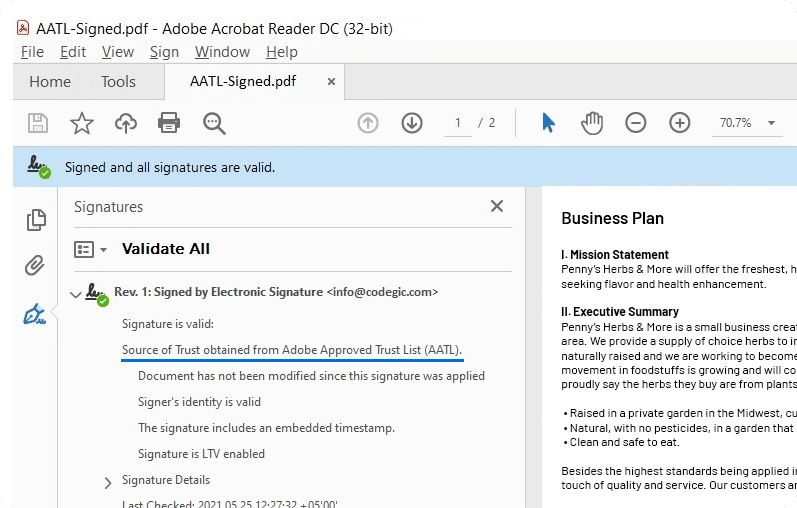
How an AATL signed PDF looks
A PDF signed with an AATL trusted digital certificate looks the same as signed with a non-AATL certificate as there are no changes in the PDF contents. The two noticeable changes are:
- Digital signature is marked as verified/trusted at the top bar
- Mentions source of Trust obtained from Adobe Approved Trust List (AATL)
Your clients will not see digital signature verification failures and start trusting your signed content more.
Components in an AATL system
AATL involves multiple business entities collaborating to ensure your digital signatures are trusted seamlessly

Cloud Provider
Hosts the HSM in the cloud at location of your choice.

AATL Provider
Validates your identity and issues AATL trusted digital certificates.

USB Token / HSM
Cryptographic keys must reside in USB token/HSM & must comply with any of these standards: FIPS 140-2 Level 2, ISO 15408 & ISO 18045, QSCD.

PDF Application
PDF signing application to process the keys and certificates.
How to get an AATL Certified Digital Certificate
- Register with an AATL Provider
- Generate keypairs inside HSM/USB Token
- Generate CSR (Certificate Signing Request)
- Send the CSR to the AATL Provider
- Integrate the issued certificate in your software

How Codegic helps in AATL based PDF Signing
Codegic is a one stop shop which helps clients from choosing the best AATL provider and developing ETSI’s PAdES complaint PDF signing software.
ETSI Standards
Create ETSI complaint PAdES digital signatures e.g. PAdES-LTV
Lowest Rates
Integrate with AATL Providers at much lower cost
Guidance
Complete guidance from key generation to PDF signing
Trusted PDFs
Signed PDF are trusted (out of the box) in Adobe Acrobat Reader DC
Multiple Providers
Support all the major Cloud KMS Providers: Google, Azure, Amazon
PDF Signing Software
Provides platform independent PADES creation software
Words from Client
Leading companies rely on us for their PKI and digital signature needs
Our team was not able to handle the AATL needs for our E-sign Service, so we researched and found Codegic. They provided a solution that worked in our workflow, and also put us in touch with an AATL certificate provider that was far less expensive than what we had been seeing. During the whole process Codegic was easy to work with, and very importantly, we did not have any communication barriers. Their skills and expertise were obvious regarding AATL and PKI and literally, the project took less than 4 weeks. It was impressive. We would not hesitate to use them again.
Aaron Jones, Founder, SignFast.com.
Pricing
The overall cost of getting AATL signed PDF documents can broken down into:
- KMS Cloud ProviderCost less than $2 per signing key per month (with 10,000 cryptographic operations) from Google, AWS, Azure
- AATL ProviderDepends upon the number of signatures to be produced, see below for details
- CodegicKhatim Sign Server, integrated with KMS using AATL issued certificate. Contact us for details.
AATL Provider Cost
The overall cost of getting AATL signed PDF documents can broken down into:
-
50K Signing$1K / year
-
100K Signing$1.6K / year
-
DiscountsGet further discount when you buy certificates for 2 or 3 years
FAQs
How long it takes to get a trusted certificate from an AATL Provider?
Normally it takes 5-7 days to get your first AATL certified certificate.
Is the timestamp service charges comes included in the AATL charges?
Yes, you get timestamping service which comes with the overall solution.
Which Cloud KMS offering should we use?
Google, AWS and Azure charge almost the same. As a rule of thumb pick the KMS service where you have deployed your PDF signing application. This will reduce network latency in performing the cryptographic operation.
What are the benefits of creating PAdES signatures?
PAdES is an ETSI standard and supports advanced PDF digital signature formats. With PAdES-LTV based signatures your users can continue to verify digitally signed PDFs even if after digital certificate expiry. PAdES-LTV signature embeds both the signing certificate revocation information and cryptographic timestamps. In short PAdES out performs older techniques of PDF signing.
Do we need another machine to host the PDF Signing Software?
Can be done both ways. You just need to look at your PDF processing load. As the core CPU processing is done at the Cloud KMS end hence the software can be deployed on existing machines unless you have really heavy load e.g. 500/1000 documents to be processed per minute. In that case a separate machine with 2 vCPU and 4 GB RAM is sufficient.
My application is written in PHP, can we still integrate?
Of course, any application which can generate an HTTP request can integrate with our software.
What if the AATL Provider Timestamp service goes down?
You can still generate signed PDF from Khatim Sign Server. The only draw back is that you won’t be able to create advanced long term digital signature for which timestamp is required but is an optional for an AATL trusted digital signature. The only external dependency is with the Cloud KMS hosting provider which if goes down will effect signing. You can optionally enable Key replication with the Cloud hosting provider to ensure 100% key availability.
Should we expect performance issues after integration?
Our PDF Signing Software ensures best performance as long as sufficient resources are available. Let us know if you have some specific performance needs. Our deployment experts will then guide you.
Do you have sandbox or test account?
Yes we can host a test environment for you to can send PDFs and get signed PDF in return.
Does the AATL provider send USB for the certifications?
Yes but you can’t use that approach because it will be single threaded and will fail when hundreds of requests are coming to sign. Signing where the key reside inside an HSM (or Cloud HSM) is the right way to go.
Can I use my own locally held HSM for the key generation?
Yes you can as long as it is a FIPS 140-2 Level 3 compliant HSM.
Is there any extra cost of the Timestamp service?
No there is no additional cost.